

Avatar.
I tried to replace myself with an AI. 5 minutes. One bad selfie. The result was uncomfortable.

I hate recording videos.
I cringe at the camera. I hate the sound of my own voice. I’m too lazy to set up lighting, do my hair, take it again because I stumbled on a word.
So this week I tried to skip it entirely.
I gave HeyGen 15 seconds of grainy café footage and one headshot. 5 minutes later I had an AI version of me that could record videos while I did literally anything else.
It worked better than I wanted it to. With one big caveat I’ll get to.
What I was actually testing
Before I go further: I wasn’t testing the voice this week.
The voice cloning HeyGen offers is fine. It’s not great. It sounds AI-generated, and I’d never publish anything that sounded like that under my name. There are other tools that do voice cloning much better, and next week I’ll show you how to plug them into HeyGen so the avatar actually sounds human.
This week was about one question: is the video good enough?
Because that’s the harder problem. Voice I can solve. I can record audio without a camera, without lighting, without my hair done. I can do that in two minutes. The video is the part I dread.
So I went in looking at the footage. Not the audio.
What HeyGen actually is
HeyGen turns a script into a video of an AI avatar speaking it. You can pick from their library of pre-made avatars (300+, every demographic) or train one on yourself.
I chose Avatar V, their newest model. The previous version, Avatar IV, has a reputation for not quite getting there. Stiff movement, slightly off lip sync, the uncanny valley problem. Avatar V is supposed to fix that.
The free plan gives you one Avatar V test video. That’s it. One shot. After that you’re paying. Plans start at $24/month annually, $29 monthly.
The 5-minute experiment
I sat down in a café. Sweaty. No makeup. Bad lighting. Phone camera. Recorded 15 seconds of myself reading the HeyGen script to the lens.
The footage looked like shit. That was the point. Most of you don’t have a studio either.
Here’s what happened next.
Step 1: Upload the clip.
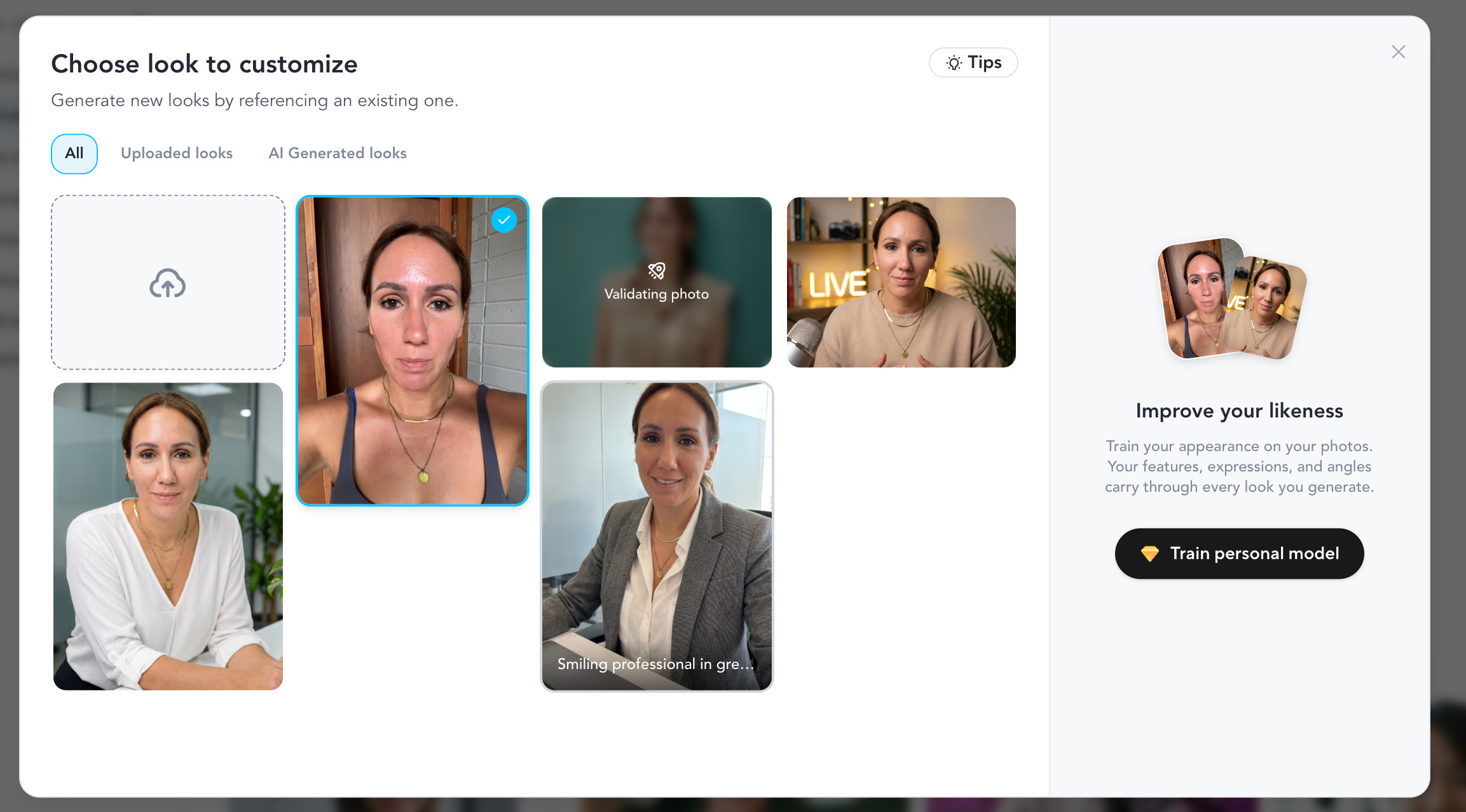
HeyGen analyzed it and generated 3 voice variations and a handful of avatar options. Office setting. Casual. Podcast. Different outfits, different backgrounds.
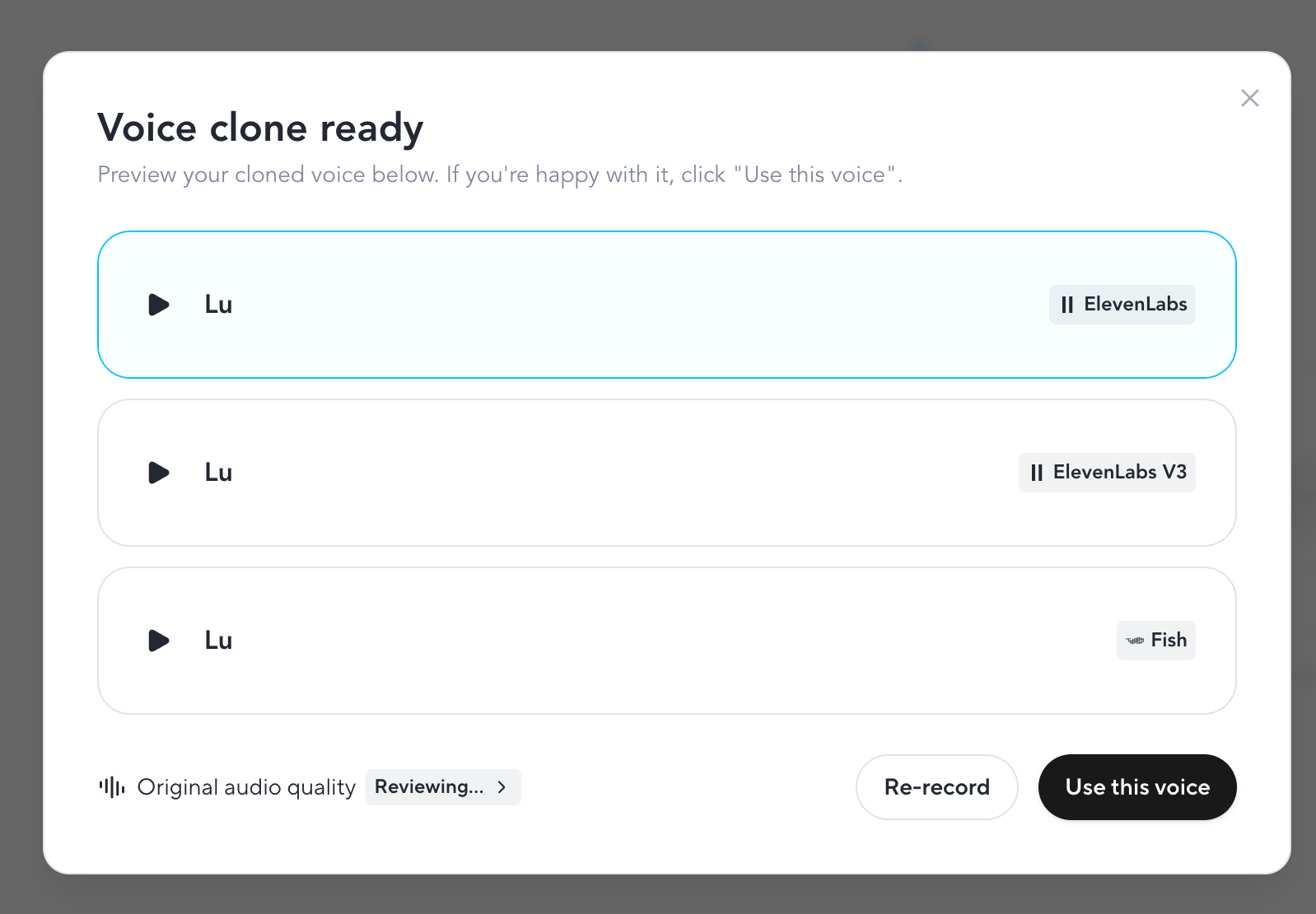
Step 2: Listen to the voices.
None of them sounded like me. They sounded AI-generated. One was less bad than the others. I picked it and moved on, because today the voice wasn’t the point.
Step 3: Look at the avatars.
Some came close to my face. None nailed it. The hair was right, the general shape was right, but the eyes were off. Slightly dead, slightly someone-else’s.
I almost stopped here.
Step 4: Upload one headshot.
This was the unlock.
HeyGen used the headshot for the face and pulled the motion from the café selfie video. See the yellow marked headshot and video above.
Suddenly the avatar moved like me. Sat like me. Tilted her head like me.
The official result
Step 5: Notice what’s wrong.
Two things. The teeth were slightly off (fixable, I wasn’t smiling in my 15 sec selfie video). And the avatar was wearing a wedding ring.
I don’t wear rings. I’m not married. My hands weren’t even in the footage I uploaded.
The AI just... decided. Maybe it was trying to tell me something. Maybe HeyGen thinks being in your thirties should come with a husband by now.
I’ll get back to the AI on that one.
Total time: 5 minutes. Total cost: zero.
The brand kit nobody talks about
This is the part most reviews skip.
I pasted my website URL (brisk.vision) into HeyGen. It went and read the site. Pulled my colors, my fonts, my visual style. Built me a brand template I didn’t ask for.
Then it offered me caption styles, intro animations, outros, transitions. All matched to the brand. All editable.
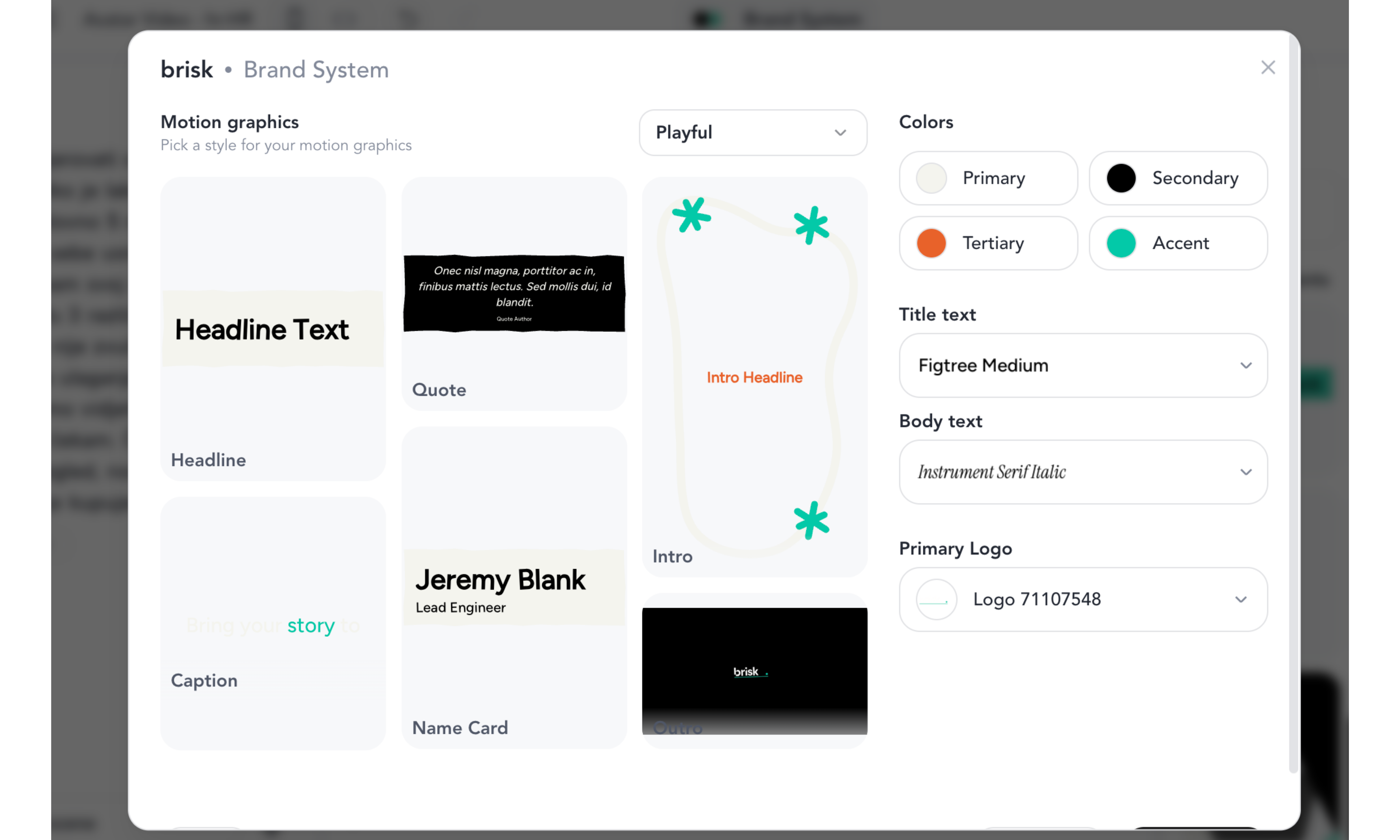
The captions were the bit that surprised me. HeyGen automatically generated them in my brand colors. Highlighted keywords in my accent shade. Used my font. The kind of polish that takes ages to do manually in CapCut or Descript.
Note: In the draft preview, you can only see the captions. You get the Avatar talking only via Video generation. I have used the free one I had. Hence I am showing below recording only for the captions, but imagine the Avatar image actually talking.
Fun fact: I’m Croatian.
So the next thing I tested was the Croatian translation.
Croatian is my benchmark for any AI tool. The grammar is brutal. Cases, genders, verb forms that change based on who’s doing the action. Most AI models butcher it.
HeyGen did okay-ish. Two issues: the translation pretended I was male (had to manually fix every verb form), and it was too literal. Not how I’d actually talk. But functional. A starting point.
If your audience speaks anything other than English, this matters more than the avatar quality.
What I couldn’t test (and won’t, until I pay)
The free plan gives you one Avatar V export. Including a watermark. I used it.
So I couldn’t test the office setting. The walking avatar. Different transitions. Different intro animations. I saw the previews. I didn’t see the finished output.
This is HeyGen’s freemium trap. You won’t know if you’ll actually use the product until you commit a month at $24-29.
I did however manage to get another free low quality video that actually looked a lot like a tired version of me (if we ignore the lip sync & voice):
My rule: never pay for SaaS until I know I’ll use it weekly.
So I’m not subscribing. Yet.
If you’re considering it, give yourself 30 days on the free plan first. Make a list of what you’d actually publish with it. If the list has fewer than 4 things, save your money.
Who should pay for HeyGen
Pay for it if
→ You publish video content weekly and hate being on camera
→ You sell a course or training and need 10+ explainer videos
→ You do client outreach and want personalized video at scale
→ You translate content into 3+ languages regularly
→ You do mind having the HeyGen watermark in your video
Skip it if
→ You post videos occasionally and don’t mind your face
→ You only need one avatar for one project
→ You’re testing whether you’ll commit to video at all (free plan first)
One pricing thing nobody warns you about: Avatar V (the good one) burns through “premium credits” fast. The Creator plan gives you 200 credits a month, which is roughly 10 minutes of premium video.
If you’re publishing 3-4 videos a week, you’ll hit the ceiling in week one. The Pro plan ($79/month annually) gets you 2,000 credits, which is the realistic tier for anyone serious about this.
The part I want my mum to read
Here’s what made me stop and think after 5 minutes of fucking around with this.
If I can build a believable avatar of myself in 5 minutes with one bad selfie, so can anyone else. They don’t even need 5 minutes. Voice cloning tools work with 3 seconds of audio. Three seconds.
I have a podcast clip somewhere. Voice notes I’ve sent. Substack videos. Instagram stories from years ago. My voice is everywhere.
So is yours.
I thought about my parents. They’re old. They trust voices. If someone called my mum tomorrow crying in my voice, asking for money because I was in trouble, I don’t know if she’d ask the right questions.
The fix is one thing: a family code word. Pick a random word. Tell your parents, your kids, your siblings, your partner. If anyone calls in a panic asking for money, ask for the word. No word, hang up and call them back on a number you already have.
Voice cloning attacks jumped over 400% in 2025. This isn’t theoretical. It’s happening to families right now. Florida. Arizona. Hong Kong. Mostly to people whose kids never thought to have this conversation.
Have the conversation. Tonight. It takes 30 seconds.
Where this gets really interesting (next week)
Last week I showed how Claude generates Instagram carousels for you. That one brought a wave of new subscribers. Thank you for being here.
This week was the manual HeyGen experiment. Slow. One-off. Click by click. Good enough for someone testing the waters.
Next week is the part I’m actually excited about.
Claude Code wired to HeyGen.
One prompt → research → script → finished avatar video.
Most popular use case: automated Reels.
No clicking. Plus the voice fix: I’ll show you how to plug a proper voice cloning tool into HeyGen so the avatar finally sounds like a human, not a corporate AI assistant.
It’s more advanced than this week. If you’ve never opened Claude Code, I’ll link back to my older walkthroughs so you can catch up. I’ll go step by step. And I’ll tell you honestly whether the setup time is worth it.
For most of you, this week’s manual workflow is enough. For the rest, next Thursday is going to be fun.
I started this experiment because I hate recording videos. I’m finishing it knowing the video technology is good enough to replace me. The voice isn’t there yet. But that’s a fixable problem, and next week I’ll fix it.
Tonight, do two things. Pick a family code word. Then try HeyGen’s free plan with one 15-second video of yourself. See what your AI twin looks like.
Tell me what type of jewelry it gives you.

PS - Let me know how it goes. I encourage you to share your good & bad AI Avatar version.
Subscribers get the full HeyGen + Claude Code setup guide incl. terminal commands directly into their Inbox next week.
You are not a subscriber? Change it now!
This article is part of my ongoing series on making AI simple and useful for non-tech people. Subscribe to get future articles on AI tools that actually matter for everyday life. And if you found something that helped you - sharing is caring 😉