

Read.
I subscribed to 40+ newsletters and read none of them. Then I trained Claude to do it for me.

There were approx. 43 newsletters sitting in my inbox last week. I opened two of them this week. Both by accident.
I didn’t subscribe because I’m lazy. I subscribed because I genuinely didn’t want to miss anything. The person writing was good. The topic was relevant. The intention was real.
Then they all arrived on the same Tuesday. I didn’t have time. So I left them on unread - I’d obviously get to them later. Two weeks later, my inbox looked like a catastrophe and I’d read exactly none of them.
The problem wasn’t the newsletters
I cannot function with unread emails. Inbox zero isn’t a productivity philosophy for me. It’s a psychological requirement.
But I subscribed to 40+ newsletters because I love them. Every single one felt worth it the moment I hit subscribe. I write one myself, which means I know exactly how much work goes into each issue.
The unread pile wasn’t laziness. It was FOMO stacked on top of bad timing, stacked on top of the kind of low-grade mental load that drains you every time you open email and see that number creep upward instead of down. I’d miss something good, buried in the pile, and only discover it three weeks later when it was no longer useful. The newsletters weren’t the problem. The delivery format was broken.
What I actually built
Before automating anything, I needed to know what I was dealing with. So I asked Claude Cowork to scan my Gmail and produce a list of every newsletter I was subscribed to, with a proposed tier list based on what it could infer about my priorities from the content.
It came back with a ranked list. I edited it. Some newsletters I thought I loved turned out to be tier 3 material when I actually looked at them honestly. A few I’d forgotten about were quietly excellent.
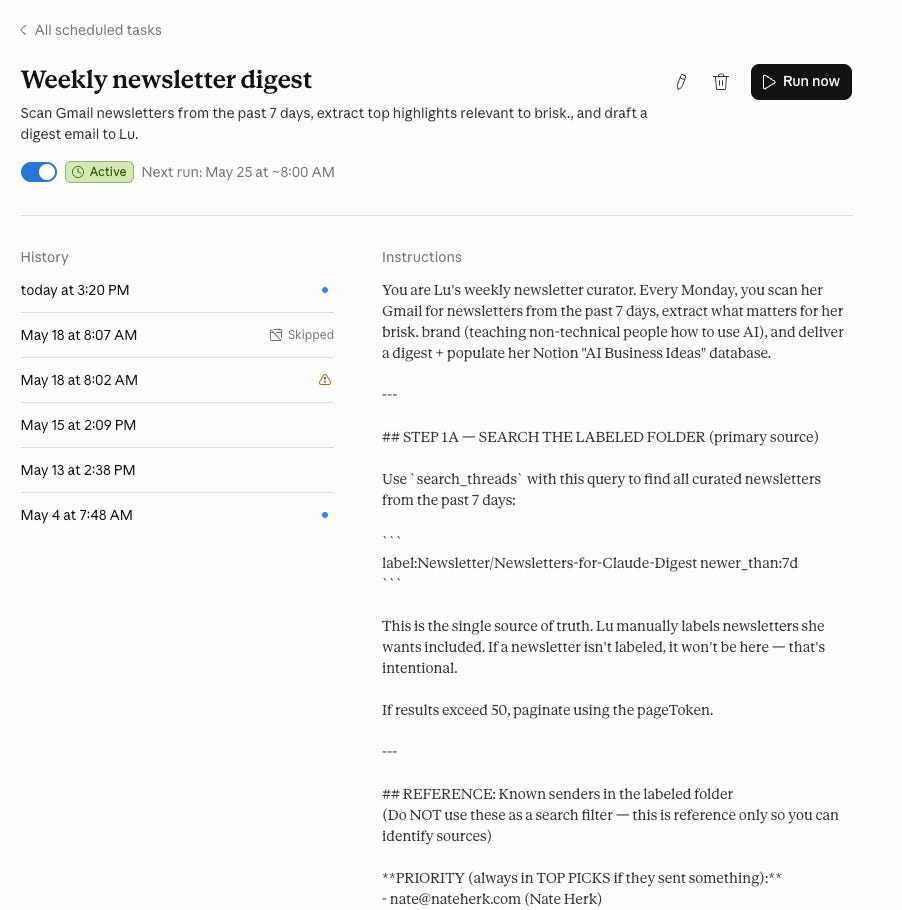
Then the practical part. I created a Gmail filter. Every newsletter on my approved list now gets a label: “claude newsletter.” They land in my inbox with that label, clearly sorted. That took 5 minutes.
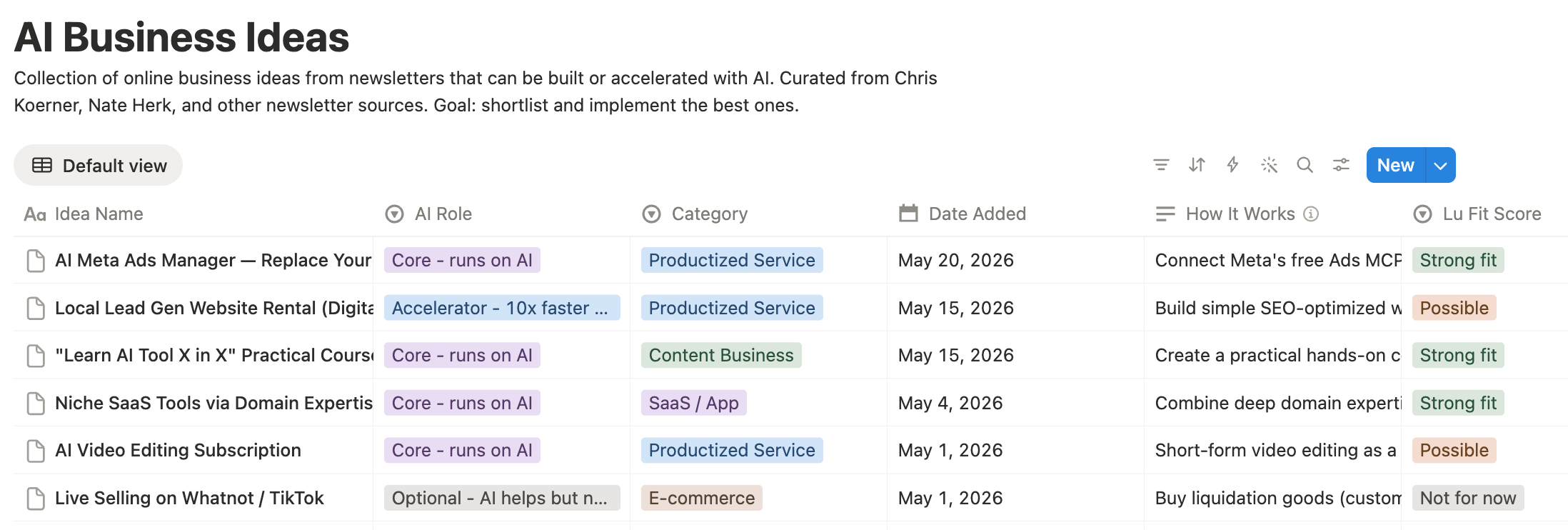
The scheduled task does the rest. Once a week, Claude scans everything labeled “claude newsletter,” clusters the content by theme, summarizes what’s relevant to me based on a brief I wrote, flags any topic appearing across multiple newsletters, and formats it as one curated email. Business ideas that surface in the digest get a separate note dropped into my Notion. Everything else stays in the email.
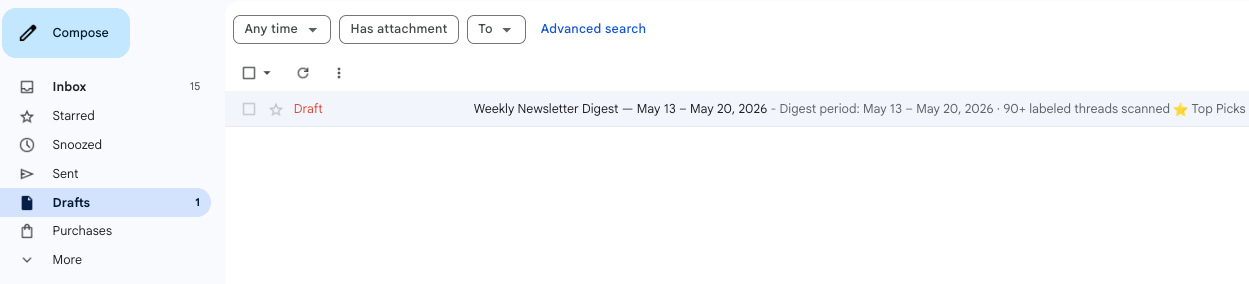
One honest limitation: Claude can’t send email directly to my inbox. It’s a current platform constraint. So the digest lands in my Drafts folder. I open it, hit send to myself, done. One click, thirty seconds.
Total setup time: 10 minutes with Claude to build the tier list and configure the task. 5 minutes to set up the Gmail filter.
2 Substackers actually made it to my Top Picks for the week, shoutout to Pietro Montaldo and Excellent AI Prompts - great articles!
What I didn’t expect
The digest is one email per week. I check it Monday morning, usually while coffee is still hot.
After a few weeks I noticed something I hadn’t planned for. The same topics kept surfacing across different newsletters in the same 7-day window. Not because anyone was copying each other. Because those topics were actually moving.
Last week’s digest flagged it clearly: five newsletters mentioned AI agents in the context of non-technical users. Three flagged the same model update. Reading them individually, scattered across different days, I would have missed that pattern entirely. The compression made the signal visible in a way that 43 separate tabs never could.
For content creators, that’s worth something on its own. If a topic is trending across your corner of the internet in the same week, you have maybe 10 days before the market saturates. The digest became part of my content radar without me designing it that way.
The honest part
There’s a version of this that feels like cheating. Newsletters are someone’s distilled thinking, and I’m having Claude compress them further. Worth sitting with for a second.
But here’s the honest answer: I wasn’t reading them before. The choice was never between AI compression and deep, careful reading. It was between AI compression and a pile of unread guilt that meant I was engaging with zero ideas per week instead of forty.
The digest didn’t replace reading. It made reading intentional. When something in the summary is actually interesting, I click through. I read the full piece. That now happens by choice instead of obligation, and it happens more often than it used to.
How to build it yourself
What you need:
Claude Pro (€17/month)
Gmail connected in Claude Cowork
Notion connected (optional - only if you want to capture business ideas separately)
15 minutes
Step 1: Ask Claude Cowork to scan your Gmail for newsletter subscriptions and produce a tier list. Edit it ruthlessly. Be honest about which ones you actually read vs. which ones just felt good to subscribe to.
Step 2: Set up a Gmail filter. Every newsletter on your approved list gets a label. This is the sorting mechanism that makes the whole thing work.
Step 3: Set up a weekly scheduled task in Claude Cowork with a brief like this one:
You are my weekly newsletter digest assistant.

Scan my Gmail for emails labeled "claude newsletter" from the past 7 days.
For each newsletter: extract ideas relevant to [your topic or audience — be specific].
Skip anything that isn't directly relevant.

Cluster the content by theme.
Flag any topic that appears across 3 or more newsletters this week.
For anything worth reading in full, include the original link.
If you find a business idea worth saving, note it separately at the top.

Format everything as one curated email.
Save the output as a Gmail draft.
The brief is everything. Vague brief gets you summaries you still won’t read. Specific brief gets you signal you’ll actually use. The more clearly you define what “relevant” means for your niche, the better the output.
This might not be for you
I’m sharing this because it works for me. Not as the answer. As an example of what’s possible.
If you love reading newsletters one by one with your morning coffee, this will feel wrong and cold and pointless. If you’re subscribed to five newsletters, you genuinely don’t need it. If inbox anxiety isn’t part of your life, skip everything above.
But if you’re subscribed to things you love and somehow never reading them, if the unread badge is quietly eating your headspace, if you’re missing good ideas not because you don’t care but because the format keeps defeating you... then 15 minutes of setup might be worth trying.
AI doesn’t have to be complicated to be useful. Sometimes a Gmail label, a brief, and one email per week is enough.
Open Claude Cowork. Start with step one.
PS - Let me know how it goes. I encourage you to share ….
Subscribers get all my Installation Guides including my explanations for dummies in the Resource section.
You are not a subscriber? Change it now!
FAQ
Can Claude read my Gmail newsletters automatically? Yes, with the Gmail connector in Claude Cowork. You set up a scheduled task that runs once a week, scans emails with a specific label, and outputs a curated digest. No coding required.
Do I need Claude Pro for this? Yes. Claude Cowork requires a Pro subscription (€17/month). The Gmail and Notion connectors are included.
What’s the difference between a newsletter summary and a newsletter digest? A summary captures what was said. A digest — as set up here — captures what’s relevant to you, filtered through a brief you write. The brief is the whole system. Without it, you get summaries. With it, you get signal.
How long does setup take? About 15 minutes total. 10 minutes with Claude to build the tier list and configure the task. 5 minutes to create the Gmail filter.
Why does the digest land in Drafts instead of my inbox? Current limitation of the platform. Claude can’t send email to your inbox directly. The draft lands in Gmail and you send it to yourself. One click.
What if Claude misses a newsletter? It can happen, especially if the email lands outside your labeled folder or arrives from a sender variant you haven’t whitelisted. Check the output Monday morning and adjust your filter over the first two weeks. It gets more accurate fast.
This article is part of my ongoing series on making AI simple and useful for non-tech people. Subscribe to get future articles on AI tools that actually matter for everyday life. And if you found something that helped you - sharing is caring 😉