

Agent Skills.
The Open Standard That’s Quietly Revolutionizing How AI Agents Work. Find your full setup cheat sheet here.

You’ve probably noticed AI agents getting better at complex tasks. They’re not just answering questions anymore. They’re writing code, filling out forms, managing your calendar.
But there’s been a problem. How do you teach an AI to do YOUR specific work? The stuff that requires knowing your company’s (or personal 😅) weird processes and institutional knowledge?
Anthropic released something in late 2025 called Agent Skills. It’s an open standard for teaching AI agents specialized tasks. Here’s the interesting part: OpenAI quietly adopted the exact same architecture. When competitors agree on a standard, pay attention. Now they dropped an official 2h course explaining all of it. Don’t have 2h?
→ I got you!
In this guide I’ll break down what Agent Skills are, why they matter, and how to build them yourself. No coding required.
The Problem
Your team fills out a compliance form fifty times a month. It has specific fields, required formats, regulatory language. You try using Claude to help.
The AI gives it a shot. But it doesn’t know Field 7 needs your legal team’s template language. It doesn’t know certain sections need specific formatting for regulators. It doesn’t know about the edge cases your team has solved over three years.
You have three bad options:
Option 1: Explain everything every time.
Copy-paste your documentation into each conversation. Hope the AI catches the nuances. Waste time repeating yourself.
Option 2: Build custom software.
Hire developers. Spend months. Pay ongoing maintenance costs. Watch it become outdated as your processes evolve.
Option 3: Do it manually.
Accept that AI can’t help with specialized work. Keep doing it the old way.
OR
Make Agent Skills Option 4.
A simple, standardized way to package your expertise so AI agents can use it automatically.
What Are Agent Skills?
An Agent Skill is a folder on your computer. It contains instructions, scripts, and reference materials. An AI agent loads it when needed.
Think of it this way. You hire a smart person. You give them training manuals, templates, how-to guides. They read them and follow your processes.
Agent Skills work the same way. Except the AI actually reads everything and follows it perfectly every time.
Three things make them powerful:
They’re just folders. No special software. No complex file formats. Regular folders with markdown files. Anyone on your team can create them with tools they already know.
They’re portable. Agent Skills follow an open standard at agentskills.io. Create a skill once, use it with Claude, potentially with other AI tools. You’re not locked to one vendor.
They’re discoverable. AI agents automatically detect available skills and decide when to use them. You don’t need to remember to “activate” anything. The agent reads descriptions and figures it out.
How They Actually Work
Agent Skills solve a fundamental problem. AI models have a context window. A limit on how much information they process at once. Dump your entire company wiki into a conversation and you hit that limit fast.
Agent Skills on the other hand use something called progressive disclosure.
Three levels:
Level 1: The Metadata
Every skill has a name and description. When an AI agent starts, it loads only these. A few sentences per skill.
It’s like a table of contents. The agent scans what’s available without reading full content.
Example:
Name: customer-complaint-handler
Description: Processes customer complaints following our standard escalation workflow, including severity assessment, routing rules, and required documentation for regulatory compliance.
The agent thinks: “If I need to handle a customer complaint, this skill is probably relevant.”
Level 2: The Core Instructions
When the agent determines a skill is relevant, it loads the complete skill file. This is a markdown document called SKILL.md. It contains detailed instructions.
Step-by-step procedures. Decision trees. Required formats. Examples. Common pitfalls.
This is where you encode your organizational knowledge.
Level 3: Referenced Files
Complex skills need supporting materials. Reference documentation. Templates. Pre-written scripts. Databases of approved language.
These live in the skill’s folder but load only when the agent needs them.
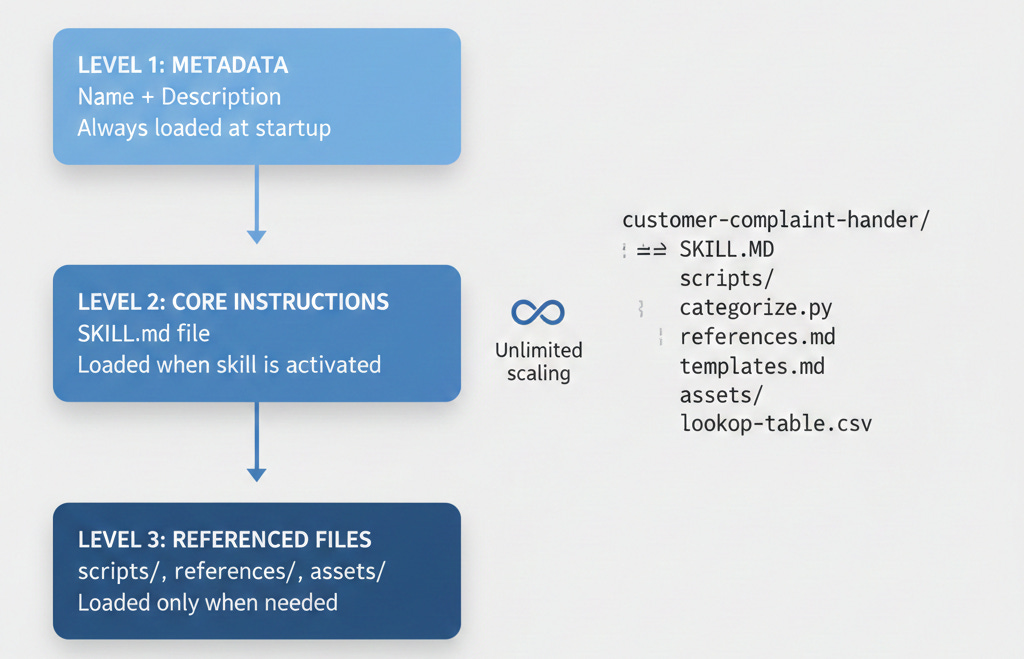
Example: Your customer complaint skill might reference:
Template for the complaint report
Database of product codes and support teams
Scripts for categorizing complaint types
Regulatory language required for certain complaints
The agent loads these only when it actually needs to generate a report or look up a product code.
Your skill can contain thousands of pages of reference material. The agent accesses information just-in-time. Like a good employee consulting a manual only when needed instead of memorizing everything.
Real Example: PDF Form Filling
Your organization fills out complex PDF forms regularly. Grant applications. Regulatory filings. Standardized contracts. Dozens of fields, specific formatting, dependencies between fields.
Without Agent Skills: Fill them manually or give the AI instructions every time and hope it gets it right.
With Agent Skills: You create a PDF form-filling skill with:
Core instructions in SKILL.md: High-level guidance on form filling, field extraction, validation rules.
Detailed procedures in forms.md: Step-by-step for identifying form fields, handling different field types, managing dependencies.
Python scripts in scripts/ folder: Pre-written code that extracts form field locations reliably.
Reference templates in references/ folder: Examples of correctly filled forms, approved language, lookup tables.
**[SCREENSHOT NEEDED: Example skill folder structure for PDF form filling showing all files and folders]**
You tell Claude “Fill out this grant application using our standard format.”
The agent recognizes the PDF skill is relevant. Loads core instructions. Executes Python scripts to extract form fields. References templates for standard sections. Follows your rules.
Result: Consistent, accurate form completion reflecting your institutional knowledge. Every time.
The Structure of an Agent Skill
Minimum Viable Skill
You need one file: SKILL.md
Two parts:
YAML frontmatter at the top:
yaml
---
name: my-skill-name
description: Brief description that helps AI decide when to use this skill license: Apache-2.0
metadata:
  author: Your Name
  version: “1.0”
---
Markdown content below:
markdown

# How to Use This Skill

When the user asks you to [specific task], follow these steps:
1. First, do this
2. Then, check that
3. Finally, output

## Important Rules
- Always include X
- Never forget Y
- If you encounter Z, do this instead

## Examples
Here’s a correct output:
[example]
Save this as SKILL.md in a folder. You have a functioning Agent Skill.
**[SCREENSHOT NEEDED: Basic SKILL.md file open in a text editor showing the frontmatter and instructions]**
Full-Featured Structure
As needs grow, add optional folders:
my-skill/
├── SKILL.md              # Required: core instructions
├── scripts/              # Optional: code
│   ├── process_data.py
│   └── validate.sh
├── references/           # Optional: docs
│   ├── templates.md
│   ├── approved-language.txt
│   └── lookup-tables.csv
└── assets/              # Optional: files
    └── form-template.pdf
It’s self-contained. Share the entire folder with a colleague. They instantly have the same capability. No installation. No configuration. No dependencies.
Create Your First Skill
Let’s build a meeting notes formatter. It converts messy voice-to-text transcripts into structured summaries following your format.
Step 1: Create Folder and File
Create a folder:
meeting-notes-formatterInside it, create:
SKILL.mdStep 2: Write Frontmatter
At the top of SKILL.md:
yaml
---
name: meeting-notes-formatter
description: Converts meeting transcripts into structured summaries following company format with action items, decisions, and follow-ups clearly identified
license: Apache-2.0
metadata:
  author: [Your Name]
  version: "1.0"
  department: Operations
---
The description is critical. This is what the AI reads to decide if the skill is relevant. Be specific. Avoid vague descriptions like “helps with meetings.” Be explicit about what problem it solves and when to use it.
Step 3: Write Instructions
Below the frontmatter:
# Meeting Notes Formatter

## Purpose
Convert raw meeting transcripts into structured summaries following our company's standard format.

## When to Use This Skill
Use this skill when the user provides a meeting transcript or asks you to format meeting notes.

## Output Format

Every summary must follow this structure:

### Meeting Summary
**Date:** [Extract or ask for date]
**Attendees:** [List all participants mentioned]
**Duration:** [If mentioned]

### Key Discussion Points
[Summarize main topics in 2-3 bullet points each]

### Decisions Made
[List any decisions in this format:]
- **Decision:** [What was decided]
  - **Context:** [Why]
  - **Owner:** [Who is responsible, if mentioned]

### Action Items
[List in this format, prioritized by urgency:]
- [ ] **[Action]** - Owner: [Name] - Due: [Date if mentioned]

### Follow-Up Topics
[Items that need future discussion]

### Parking Lot
[Topics raised but deferred]

## Important Rules

1. Be concise but complete. Capture all decisions and action items. Summarize discussions.
2. Identify ownership. Always try to extract who is responsible for each action item.
3. Flag ambiguities. If a decision or action item lacks clarity, note this explicitly.
4. Preserve important details. Don't lose critical technical specs, numbers, or commitments.
5. Use professional tone. Clean up casual language while preserving meaning.

## Examples

[Include a sample transcript and its correct formatted output]
Step 4: Add Optional References
If your team has specific terminology or format examples, create a
references/folder.
meeting-notes-formatter/
├── SKILL.md
└── references/
    ├── terminology-guide.md
    └── example-summaries.md
In SKILL.md, reference these: “Refer to references/terminology-guide.md for correct usage of company terms.”
Step 5: Install Your Skill
Installation depends on your platform.
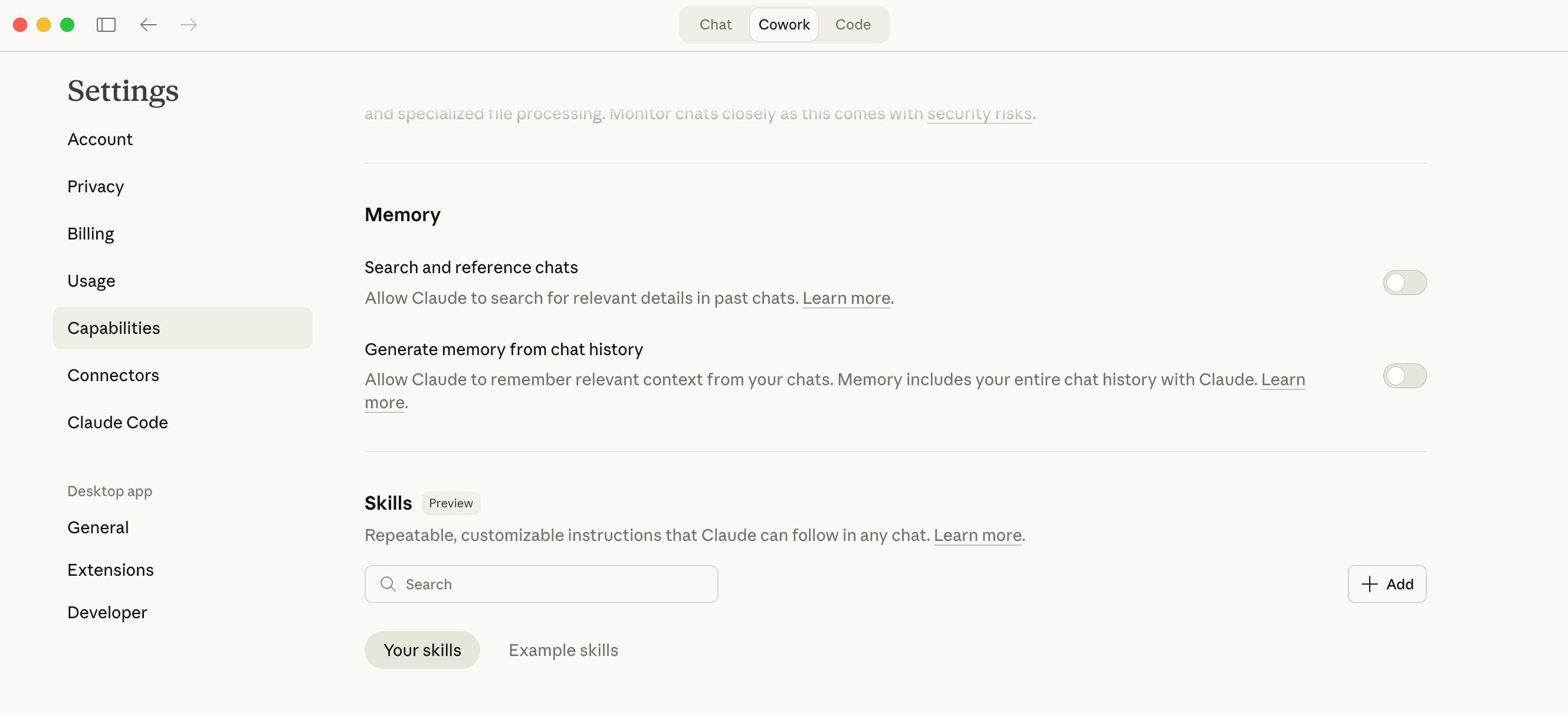
For Claude: Skills are on Pro, Team, and Enterprise plans. Upload through account settings. For Claude Code (command-line tool), skills go in
~/.claude/skills/For other platforms: Check their documentation. Any tool implementing the Agent Skills standard will have instructions for where to place skill folders.
Step 6: Test It
Start a conversation with Claude. Paste a meeting transcript. Say: “Please format these meeting notes.”
The agent recognizes your skill is relevant. Loads it. Produces formatted notes following your exact specifications.
You don’t say “use my meeting notes skill.” The agent reads the description, determines relevance, uses it automatically. That’s discoverability.
**[SCREENSHOT NEEDED: Example of Claude using the meeting notes skill, showing input transcript and formatted output]**
Best Practices
Write Descriptions Like Job Postings
Your description should clearly state what problem the skill solves and when to use it. Think job posting. You want the AI to self-select based on clear criteria.
Weak: “Helps with customer service tasks”
Strong: “Handles tier-2 technical support inquiries for our SaaS product, including account access issues, billing questions, and basic API troubleshooting, following our standard escalation procedures and approved response templates”
The strong version gives clear signals about when this skill is relevant.
Keep SKILL.md Under 500 Lines
The entire SKILL.md loads when the skill activates. Keep it concise for fast loading and efficient context use. Extensive reference material goes in separate files in the references/ folder.
Use Clear, Imperative Instructions
Write like you’re training a detail-oriented but literal-minded colleague.
Vague: “Try to organize the data nicely”
Clear: “Sort data by date (newest first), then by priority (High/Medium/Low). Format as a markdown table with columns: Date | Priority | Description | Owner”
Include Examples
Examples are powerful for AI agents. Show correct and incorrect outputs:
## Example: Correct Output
[show what success looks like]

## Common Mistakes to Avoid
[show what NOT to do and why]
Make Skills Composable
Create focused skills that work together. Don’t make one massive skill that handles everything. This gives flexibility and makes maintenance easier.
Instead of “customer-service-everything,” create:
`customer-inquiry-classifier` (determines inquiry type)
`billing-support` (handles billing questions)
`technical-support-tier1` (handles basic tech support)
`escalation-handler` (manages escalations to humans)
The agent uses multiple skills in one conversation as needed.
Version Your Skills
Update version numbers as you refine skills. This helps track changes and roll back if needed. Use semantic versioning: 1.0, 1.1, 2.0.
Test with Edge Cases
After creating a skill, test with:
Happy path (typical use)
Edge cases (unusual but possible scenarios)
Invalid inputs (what should the agent do with bad data?)
Refine instructions based on how the agent handles these tests.
Advanced: Scripts and Code
One of the most powerful aspects of Agent Skills is executable code. Some tasks are better handled by deterministic code than AI generation.
When to Use Scripts
Add scripts when:
1. Precision is critical (math, data validation, format conversion)
2. Performance matters (large datasets, complex transformations)
3. Consistency is required (must be done exactly the same every time)
4. Integration is needed (APIs, databases, internal systems)
Supported Languages
Most implementations support:
Python for data processing, analysis, API integration
Bash for file operations, system tasks
JavaScript/Node.js for web tasks, JSON processing
Example: Adding a Python Script
Let’s enhance our meeting notes formatter with a script that extracts action items automatically.
Create
scripts/extract_action_items.py#!/usr/bin/env python3
"""
Extracts action items from meeting transcript using keyword patterns
"""
import re
import sys
import json
def extract_action_items(transcript):
"""Find sentences containing action item indicators"""
patterns = [
r"([A-Z][a-z]+ (?:will|should|needs to|must)) ([^.!?]+[.!?])",
r"(Action item[s]?:) ([^\n]+)",
r"(TODO:) ([^\n]+)",
]
action_items = []
for pattern in patterns:
matches = re.finditer(pattern, transcript, re.IGNORECASE)
for match in matches:
action_items.append({
"text": match.group(0),
"context": match.group(0)
})
return action_items
if __name__ == "__main__":
transcript = sys.stdin.read()
items = extract_action_items(transcript)
print(json.dumps(items, indent=2))Update SKILL.md to reference this script:
## Action Item Extraction

To reliably extract action items:

1. Run `python scripts/extract_action_items.py` with transcript as input
2. Review extracted items for accuracy
3. Format each according to standard format
4. Add any items the script missed based on context
When the agent uses your skill, it executes this script to get structured action items. Then it uses language understanding to refine and format them.
Notes About Scripts
Scripts should be self-contained. Document dependencies clearly.
Handle errors gracefully. Include error handling and useful error messages.
Make them deterministic. Same input produces same output.
Document thoroughly. Include comments explaining what the script does and how to use it.
Industry Adoption
Here’s where it gets interesting. Agent Skills is becoming more than an Anthropic feature. It’s becoming an industry standard.
OpenAI’s Quiet Adoption
In early 2026, developers discovered OpenAI had implemented structurally identical architecture in ChatGPT and its Codex CLI tool. The directories contain skill files that mirror Anthropic’s specification exactly. Same file naming. Same metadata format. Same directory organization.
This wasn’t announced. But it’s hugely significant. When competing AI companies adopt the same standard, the approach has fundamental merit and staying power.
The Open Standard Advantage
Anthropic published the Agent Skills specification at agentskills.io as an open standard:
Anyone can implement it without licensing fees
The specification is publicly documented
The community can contribute improvements
Skills are portable across platforms
This is like how Markdown became the universal format for formatted text. Or how JSON became standard for data exchange. When something is simple, useful, and open, it gets widely adopted.
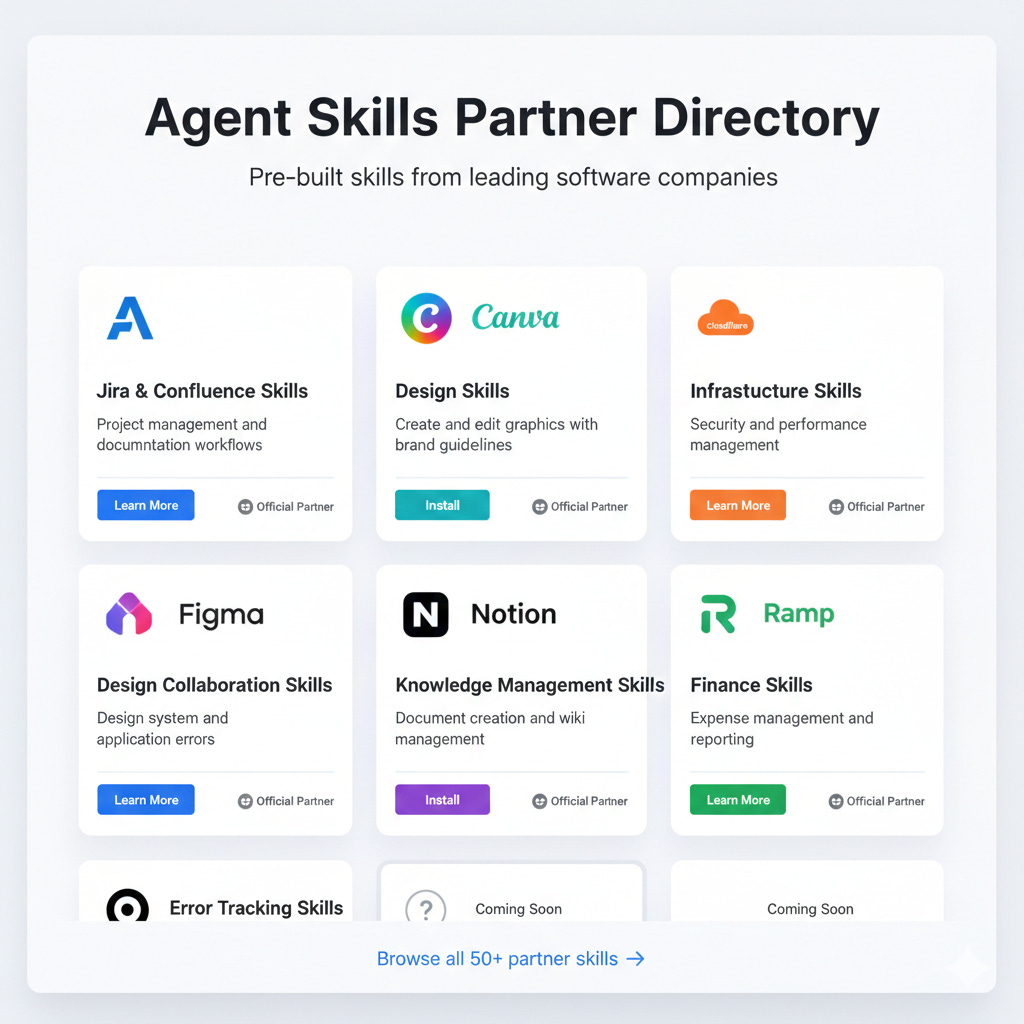
Commercial Partner Directory
Anthropic launched a directory of skills from major commercial partners:
Atlassian (Jira, Confluence skills)
Canva (design and content creation)
Cloudflare (infrastructure and security)
Figma (design collaboration)
Notion (knowledge management)
Ramp (financial operations)
Sentry (error tracking and debugging)
You can get pre-built, professionally developed skills for common business tools without creating them from scratch.
Where This Is Heading
Agent Skills will likely become infrastructure. A standard way to extend AI capabilities that works across platforms.
We’ll probably see:
Skills marketplaces where people share or sell specialized skills
Industry-specific skill libraries (healthcare, legal, finance)
Automated skill generation from existing documentation
Skill management platforms for enterprises
Use Cases for Non-Technical Teams
You might think this requires programming. It doesn’t. Many effective skills are just well-structured instructions.
Real-world use cases:
Marketing & Communications
Brand Voice Enforcer
Contains brand guidelines, approved terminology, tone examples. Ensures all AI-generated content matches your brand voice. Includes examples of on-brand vs. off-brand content.
Content Repurposing Pipeline
Instructions for converting long-form content into social posts, emails, blog excerpts. Specifies character limits, hashtag strategies, call-to-action formats. References templates for different content types.
Sales & Customer Success
Proposal Generator
Templates for different proposal types. Approved pricing language and terms. Instructions for customizing based on customer segment. Checklist of required sections and disclosures.
Customer Health Check Analyzer
Framework for assessing customer health metrics. Decision tree for escalation scenarios. Templates for different types of outreach based on health score.
Operations & HR
Onboarding Document Creator
Standard onboarding checklist and timeline. Templates for welcome emails, first-week schedules. Department-specific information. Instructions for customizing based on role type.
Meeting Scheduler
Instructions for coordinating complex multi-party meetings. Time zone handling protocols. Standard meeting agendas for different meeting types. Follow-up procedures.
Legal & Compliance
Contract Review Checklist
Key clauses to verify. Red flag terms requiring escalation. Standard approved language for common scenarios. Instructions for documenting review findings.
Compliance Report Generator
Required sections and format for regulatory reports. Data sources and citation methods. Approval workflow and sign-off procedures.
Product & Project Management
User Story Creator
Template for well-formed user stories. Acceptance criteria framework. Instructions for priority assignment. Examples of good vs. poorly written stories.
Project Status Reporter
Standard format for status updates. RAG (Red/Amber/Green) status criteria. Stakeholder communication guidelines. Escalation protocols for at-risk projects.
None of these require programming. They’re organizational knowledge and best practices in a format AI can reliably follow.
Getting Started
Your roadmap:
Week 1: Explore and Learn
Get access to a platform supporting Agent Skills. Claude Pro, Team, or Enterprise includes skills at no extra cost. Or explore other platforms implementing the standard.
Try existing skills. Start with Anthropic’s partner directory. Test skills relevant to your work. Pay attention to how they work and what makes them useful.
Identify a use case. Look for repetitive tasks you explain to AI frequently. Find workflows where you copy-paste the same instructions. Identify areas where AI output is inconsistent or misses your requirements.
Week 2: Create Your First Skill
Start simple.Choose a straightforward use case. Create a basic SKILL.md with instructions only (no scripts). Aim for something you can complete in an hour.
Test thoroughly. Use your skill in real work scenarios. Note where it succeeds and fails. Iterate based on actual results.
Refine based on feedback. Update instructions for clarity. Add examples where the agent struggles. Adjust the description if the skill isn’t activating when it should.
Week 3: Expand and Share
Create 2-3 more skills. Address your highest-impact use cases. Experiment with different structures. Consider adding references or templates.
Share with your team. Document how to install and use your skills. Gather feedback from colleagues. Create team-specific skills based on shared needs.
Establish a skill library. Create a shared location for team skills. Version control them (Git works great). Document what each skill does and when to use it.
Ongoing: Build Your Skills Ecosystem
Monitor and maintain. Track which skills get used most. Update skills as processes change. Retire skills no longer needed.
Measure impact. Time saved on repetitive tasks. Consistency improvements. Reduction in errors or rework.
Explore advanced features. Add scripts when appropriate. Create composite skills that work together. Contribute to open-source skill libraries.
Common Questions
“Isn’t this just prompt engineering?”
Sort of, but with crucial differences. Prompt engineering means crafting good instructions within a conversation.
Agent Skills:
Are reusable across many conversations
Load automatically based on context
Can include executable code and reference files
Follow a standardized format working across platforms
Scale better for complex or extensive instructions
Prompt engineering is “what you say.” Agent Skills are “what the agent knows.”
“Will I need to create skills for everything?”
No. Agent Skills are for specialized, repeated tasks where you need consistency and expertise. For one-off questions or general tasks, the base AI model works fine.
Create skills when:
You give the same instructions repeatedly
Consistency and accuracy are critical
You’re encoding institutional knowledge
The task involves specific formats or procedures
“What if my processes change?”
Skills are just files. Easy to update. Edit SKILL.md, save, changes take effect immediately. This is an advantage over traditional software. No redeployment or complex update procedures.
“Can skills access my private data?”
Skills themselves are just instructions and resources. They don’t inherently access anything. When an agent uses a skill, it operates with whatever permissions the agent has in your environment. Always follow security best practices for data the agent might access.
“Do I need programming skills?”
Not at all. Many valuable skills are simply well-structured instructions and templates. Code is optional and should only be added when it genuinely makes the skill more effective.
The Bottom Line
Agent Skills represent something significant: the democratization of AI customization.
Previously, getting AI to consistently perform specialized tasks required either expensive custom development or constantly managing prompts. Agent Skills provide a middle path. Domain experts (not programmers) can encode their knowledge in a format AI can reliably use.
The fact this is emerging as an open standard rather than a proprietary feature matters more. Your investment in creating skills isn’t locked to one platform. A growing ecosystem of shared skills exists that you can use and contribute to. AI agents are becoming platforms. General-purpose tools you extend with capabilities relevant to your work.
For the AI-curious professional, this is an invitation to move from passive AI user to active capability builder. You don’t need to understand machine learning or neural networks. You just need to understand your work well enough to document it clearly. Something you likely already do when training human colleagues.
The skills you create become organizational assets. They capture institutional knowledge in a form immediately actionable by AI agents. As these agents become more capable and integrated into daily work, having a library of well-crafted skills could become as important as having well-documented processes.
We’re still early. The standard was only recently opened. Adoption is just beginning. Best practices are still emerging. This is the perfect time to start experimenting, learning, and building capabilities that make AI genuinely useful for your specific needs.
AI agents will become more capable. The question is whether you’ll actively shape how they work for you or passively accept whatever generic capabilities they provide.
Agent Skills give you the tools to choose the former.
→ What are you building with Agent Skills? Drop a comment below.
This article is part of my ongoing series on making AI simple and useful for non-tech people. Subscribe to get future articles on AI tools that actually matter for everyday life.